
























notchpad
The secure notepad and clipboard manager for your Mac.
NotchPad Hid a Clipboard Manager in the One Part of Your Mac Everyone Complained About
The Macro: The Boring Utility App That Never Actually Gets Boring
Here’s the thing about productivity tools for Mac: the market is simultaneously overcrowded and underserved. Everyone has a clipboard manager. Everyone has a notes app. And almost nobody is happy with either.
Mac shipments rose by double digits year over year in 2025, according to Cult of Mac, and Apple’s Mac revenue hit $42.3 billion in 2024. More Macs means more people staring at the same problem: context switching is a productivity killer, and the apps designed to prevent it often cause it.
The clipboard manager category specifically is a mess. Raycast does it. Alfred does it. There are standalone apps. There are browser extensions. Most of them require you to either pay for a subscription, configure a bunch of hotkeys you’ll forget, or accept that your clipboard history is floating somewhere in a cloud server you don’t control.
Which, look. That last part matters more than people admit. If you’re a developer or designer copying API keys, passwords, internal URLs, client data, the clipboard is genuinely sensitive. Most apps treat it like a convenience feature. Very few treat it like something that needs protection.
I’ve been watching the menu bar utility space get more interesting lately. We covered Hush’s approach to desktop noise reduction and the anti-subscription argument for prompt management tools, and NotchPad fits squarely in that same conversation. Small, local, one-time purchase, no cloud. It’s a philosophy as much as a product category.
The real question is whether a creative use of hardware real estate is enough of a differentiator when the underlying features exist everywhere else.
The Micro: A Notepad That Lives Where Your Camera Does
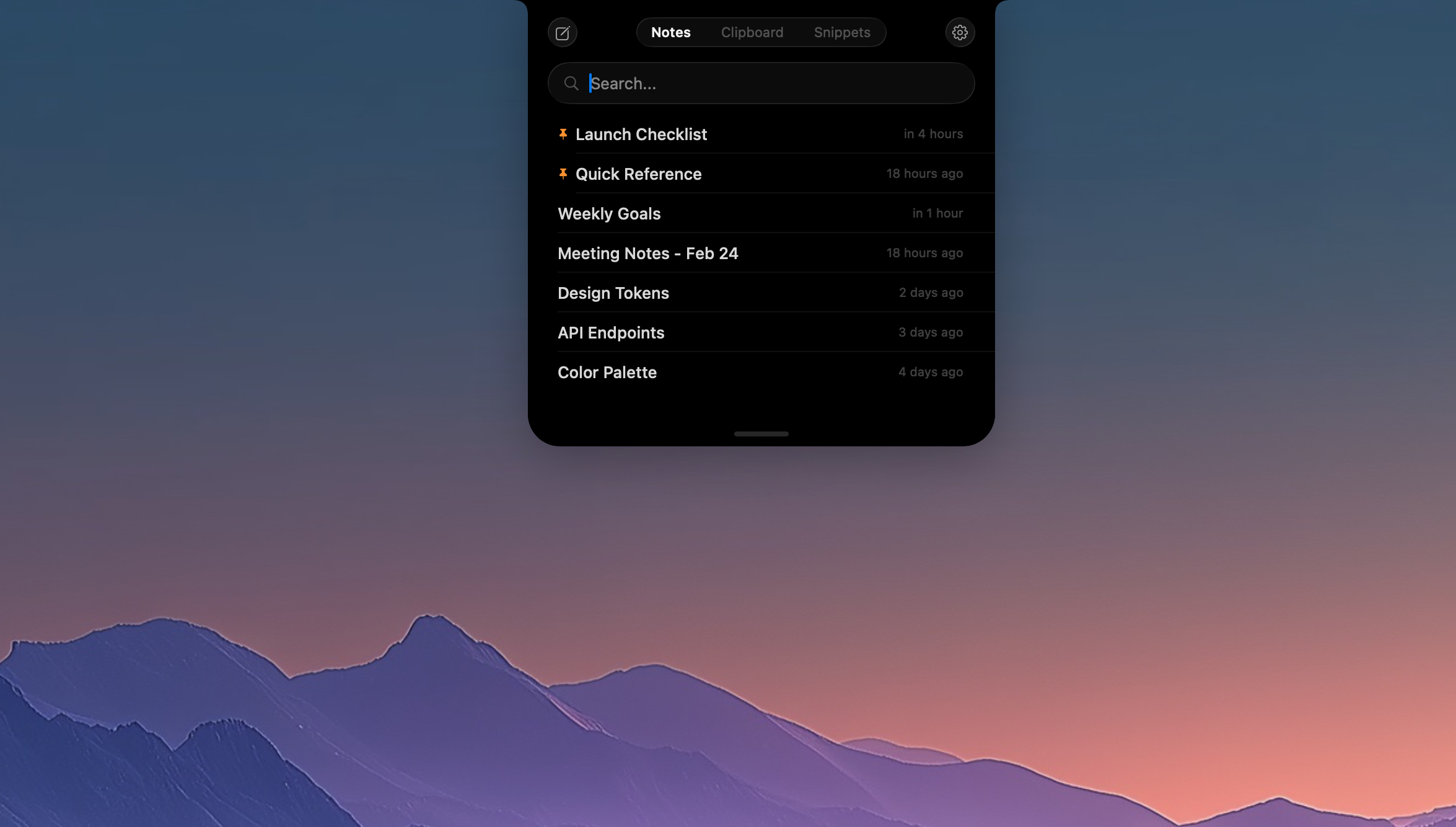
NotchPad does exactly what it says. It lives inside the MacBook Pro notch, that black rectangular cutout Apple introduced and everyone immediately resented. Hover over it, the panel drops down. Click away, it disappears. No window. No alt-tab. No losing your place in whatever you were doing.
The app has three core functions: a quick notepad with rich text support, a clipboard history manager, and a snippets library for reusable text. Notes support bold, italic, and lists. You can pin items to the top and search across everything. The clipboard history saves automatically and lets you search, pin, or merge copied items. The snippets tool is straightforward, store text or code you use constantly and pull it up instantly.
The security angle is the genuinely interesting product decision here. NotchPad automatically detects when something copied to your clipboard came from 1Password, Bitwarden, or Apple Passwords, and encrypts it with AES-256-GCM on the fly. Touch ID locks and unlocks the whole thing. Nothing leaves your machine.
That’s not table stakes. Most clipboard managers don’t do this.
It requires macOS 15 Sequoia or later, which is a real constraint. If you’re running anything older, you’re out. For users who don’t have a notch at all, like iMac owners, the app still works via a double Control key shortcut, so the notch is the marquee interaction but not the only one.
Pricing is $9.99 one-time after a 15-day free trial. No subscription. It got solid traction when it launched on Product Hunt, which is about what you’d expect for a well-executed utility with a clever hardware hook.
The version available is 1.0.7, downloadable directly from GitHub. Early days, clearly. But the core loop works and the premise doesn’t need much explaining, which is usually a good sign.
The Verdict
I like this more than I expected to.
The notch gimmick is real, but it’s not only a gimmick. The interaction model is genuinely lower-friction than anything that requires a hotkey sequence or a menu bar click. Hover, type, done. For people who live in their editor or browser all day and hate breaking flow, that matters.
What I’d want to know at 30 days is whether the clipboard encryption actually catches password manager data reliably or whether it’s inconsistent enough to create a false sense of security. That’s a specific failure mode that would be bad.
At 60 days, the Sequoia requirement will start showing up as a friction point in reviews. A lot of people don’t upgrade immediately, and “requires the latest macOS” is a real limiter for a $9.99 app trying to grow through word of mouth.
At 90 days, the question is whether the snippets feature has enough depth to compete with what dedicated snippet and productivity tools already do on Mac. Right now it’s simple. Simple is fine until your power users want more.
Still. Local storage, no subscription, real encryption, one clever hardware interaction. For $9.99, the risk is basically zero. I’d try it.