poptask
Light menu bar task manager for quickly capturing tasks
PopTask Thinks You Shouldn't Have to Think Before Writing a Task
The Macro: Everyone Is Drowning in Tabs and Nobody Has a Good To-Do List
Here’s the thing about productivity software: there’s a lot of it. Like, embarrassingly a lot. The productivity apps market is projected to grow from around $14.5 billion in 2026 to nearly $31 billion by 2034, according to Fortune Business Insights. That’s almost a doubling in under a decade, and I don’t think it’s because people are getting more productive. I think it’s because every solution spawns three new problems, and someone builds an app for each of those.
The menu bar task capture niche specifically is a funny little corner of this. The pitch is always the same: frictionless. Just hit a shortcut, type the thing, move on. Fantastical does it for calendar events. Drafts does it for text. Things 3 has Quick Entry. OmniFocus has a capture inbox. None of them are bad, exactly. But they all still ask you to be somewhat coherent before they do anything useful.
That’s the gap PopTask is going after.
The broader move here is AI eating the formatting layer. You see it in calendar apps, in note-taking tools, even in how Notion is positioning itself as a substrate for AI agents. The thesis is basically: stop making users conform to the software’s mental model. Let the software figure it out. For heavyweight knowledge work tools that’s an interesting bet. For something as tactile and fast as task capture, it might actually matter more.
Because the real failure mode of to-do apps isn’t the app. It’s the three seconds of hesitation before you type, where you’re mentally formatting your thought into something the app will understand. That’s the thing worth killing.
The Micro: It Lives in Your Menu Bar and Doesn’t Ask Much of You
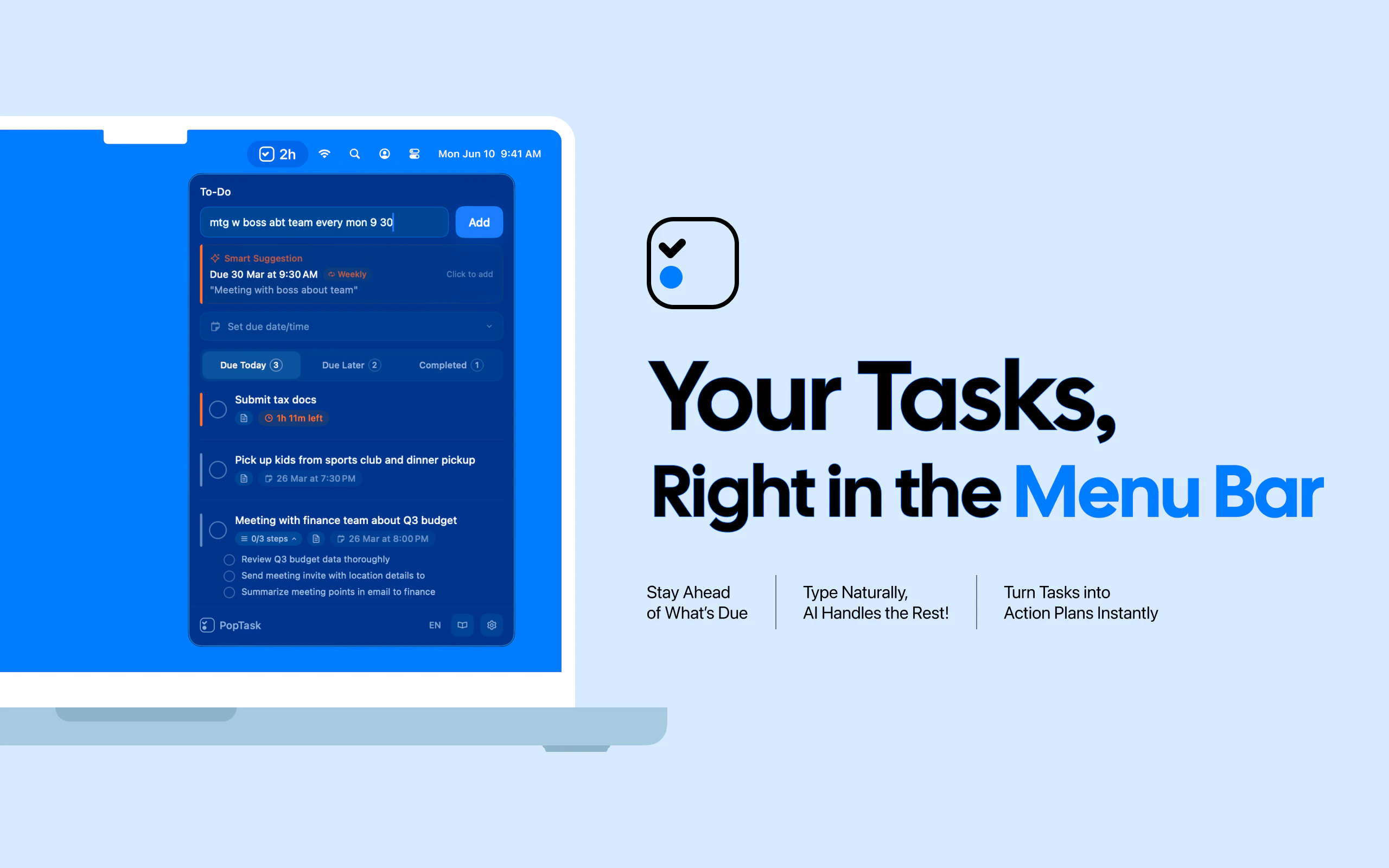
PopTask is a macOS-only app that sits in your menu bar and does one thing well: it lets you throw a messy, half-formed thought at it and come out with a scheduled task on the other side.
The core feature is natural language input that’s explicitly designed to handle slang, shorthand, and general human messiness. Not just “remind me at 3pm” clean sentences. The kind of thing you’d actually type when you’re mid-flow and can’t slow down to be grammatically correct. The AI parsing happens on-device for macOS 26 and later, which is a real differentiator for anyone who doesn’t want their half-baked task list leaving their machine. Cloud processing is available for earlier macOS versions, so you’re not blocked if you haven’t upgraded.
On top of the capture piece, PopTask includes AI-powered task breakdown (so you can throw in something like “prep for the big Q3 thing” and it’ll help you decompose it) and smart countdown alerts. The countdown UX sounds small but I actually think it’s a good call. A deadline that says “4 hours remaining” hits differently than a timestamp.
It supports seven languages, which matters more than it sounds. Most of the nuance in natural language task parsing is language-specific, and building that out for seven languages at launch is not trivial.
It launched to solid traction on Product Hunt, landing the number two spot on its launch day.
The interesting product question is whether the on-device AI is actually good enough to handle the messiness it’s promising to handle. On-device models are getting better fast (and Apple Silicon makes this more viable every year), but “understands slang” is a claim that needs to survive contact with actual users across all seven of those supported languages. Clico’s bet on AI doing more with less friction ran into similar questions about whether the intelligence layer held up under real-world use.
The menu bar form factor is the right call. This should be fast or it should not exist.
The Verdict
I like the core idea here. The enemy PopTask is fighting, which is the formatting tax you pay before you’re allowed to write a task, is a real and underrated problem. And the on-device AI angle is smart positioning given how much people are starting to care about what leaves their machine.
What I’d want to watch at 30 days is retention. Task managers have a brutal onboarding cliff. People try them when they’re feeling organized and abandon them when they’re not. The question isn’t whether PopTask is good at capturing tasks. It’s whether people build the habit of reaching for it over whatever reflex they already have, whether that’s a Notes widget, a text to themselves, or just a sticky note.
At 60 days I’d want to know if the natural language parsing is holding up for edge cases. “AI understands your slang” is a great line until it doesn’t, and one bad parse at the wrong moment can break trust with the whole product.
The macOS-only constraint is real but it’s also honest. Better to be excellent on one platform than mediocre on three. PIO’s cross-platform ambitions are a useful contrast here. Sometimes scoping down is the right call.
If the on-device model is actually solid, PopTask has something. If the parsing flakes under pressure, it’s just a pretty input box.