notion-mcp
Your Notion workspace, inside every AI agent
Notion Wants to Be the Brain Every AI Agent Borrows From
The Macro: Your Productivity Stack Has a Memory Problem
Here’s the actual issue. You have notes in Notion, tasks in Linear, context in Slack, and an AI assistant that knows none of it. Every time you open a new chat, you’re re-explaining yourself. The assistant is powerful and totally uninformed. You are the integration layer, manually.
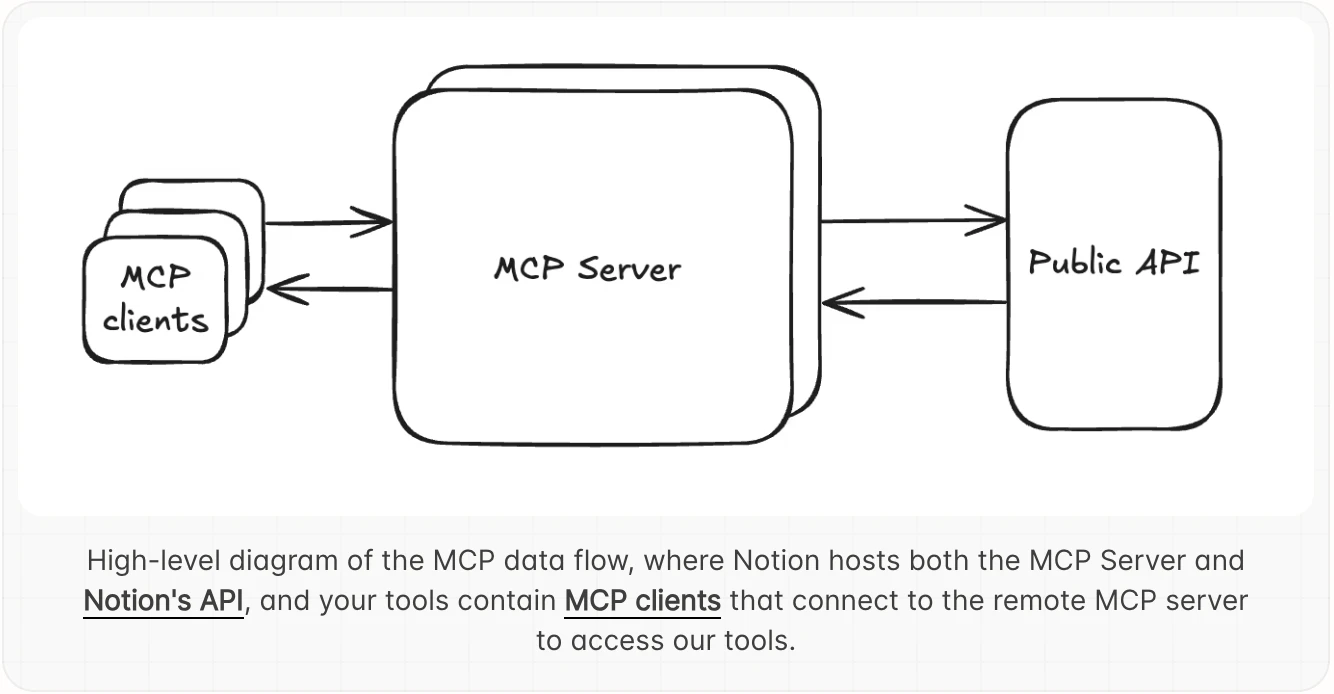
This is the problem the MCP protocol is trying to solve at an architectural level. MCP, which stands for Model Context Protocol, is a standard that lets AI agents connect directly to external tools and data sources with persistent, structured access. Not copy-paste. Not a one-time export. Live read and write access.
The productivity software market is enormous and growing fast. According to multiple sources, including Yahoo Finance and Precedence Research, the global business productivity software market sits around $62 to $71 billion in 2024 and is projected to expand significantly through the next decade. The productivity apps segment specifically is expected to grow at roughly 10% CAGR through 2034, according to Fortune Business Insights. There is real money in making knowledge workers more efficient, and AI is currently the dominant vector everyone is betting on.
Notion is not alone in building MCP server support. Skyvia, Bright Data, and BrowserAct have all recently published roundups of the best MCP servers available right now, and Notion sits alongside tools from GitHub, Google Drive, Slack, and others. The MCP space is filling up fast.
But Notion has a specific structural advantage here. Its whole value proposition has always been that it is a single place where teams store everything: docs, wikis, project databases, meeting notes. If any tool is positioned to be the memory layer for an AI agent, it’s the one that was already supposed to be your second brain.
Whether that advantage holds is the actual question.
The Micro: What Happens When Claude Can Read Your Wiki
Notion MCP is an officially supported integration that connects AI clients, specifically Claude, ChatGPT, and Cursor are named on the developer docs, directly to a user’s Notion workspace. The connection gives those agents real-time read and write access to pages, databases, and content blocks. You’re not sending a snapshot. The agent is operating inside your actual workspace.
Setup lives in Notion’s developer documentation. There’s a guided flow for connecting to the MCP server, a list of supported tools covering page creation, database queries, block editing, and search, and a security best practices section, which I’d actually recommend reading before you hand any AI agent write access to anything.
The practical use cases described are things like: having an agent generate a project report and write it directly into a Notion page, querying your task database to surface what’s due, or organizing notes into structured formats without touching the keyboard. Anecdotally, several LinkedIn posts I came across described workflows like using voice input through a third-party tool, routing it through Claude with Notion MCP connected, and having finished documents appear in Notion without manually writing anything.
One post referenced an AI companies team using Notion MCP internally to prepare presentations. Another described connecting it to Cursor to query a personal knowledge base while writing code. The range of setups people are building suggests the integration is flexible enough that the ceiling is mostly set by what you already have in Notion.
It got solid traction on launch day, which tracks. This is a product Notion’s existing user base already had a reason to want.
The most interesting product decision here is that Notion published this through its developer documentation rather than as a polished consumer feature. It feels like infrastructure, not a feature launch. That framing matters. It means Notion is positioning itself as a platform other agents build on, not just a place where you write things down.
For an overview of how other tools are approaching this same agentic layer, Clico’s approach to keeping AI interactions inside a single interface is a useful contrast. Different bet, same underlying pressure.
The Verdict
I think this is a real move, not a press release.
Notion has always had a positioning problem: it’s powerful but it requires discipline to maintain. Most people’s Notion workspaces are a graveyard of half-finished templates and abandoned project databases. If AI agents can actually navigate that mess and surface useful things, or better yet, help maintain structure automatically, that’s a meaningful reason to keep paying for Notion instead of switching to something lighter.
The question I’d want answered at 30 days is how well the agent actually handles messy, real-world Notion workspaces versus the clean demo setups everyone shows in their LinkedIn posts. At 60 days, I want to know if write access is causing problems. Giving an agent the ability to edit your wiki is a different risk profile than giving it read access, and the security documentation existing at all suggests Notion knows this.
At 90 days, the real test is whether this deepens Notion’s moat or just makes it easier to export everything to a competitor once agents get good enough to work anywhere. Anthropic is already pushing Claude toward more autonomous operation, which means the agents reading your Notion workspace today will be doing considerably more with it soon.
Notion MCP is the right product at the right moment. Whether it’s the right strategy long-term depends on how quickly the rest of the stack catches up.