zzzappy
Science-backed breaks to protect your vision & prevent RSI
Your Mac Knows You're Destroying Your Wrists. Zzzappy Is Finally Listening.
The Macro: We Broke Our Bodies and Called It Productivity
Here’s the thing about working on a Mac all day: the machine gets better every year and your body does not. Apple shipped 25.6 million Macs in 2025, up 11 percent from the year before, according to IDC. That’s a lot of people hunched over keyboards, stacking keystrokes, forgetting to blink.
The break reminder space is not exactly empty. Stretchly has been around for years. Time Out on macOS has a small but loyal following. There are browser extensions, menubar timers, focus apps with built-in rest prompts. Most of them do one thing: pop up and tell you to stop. Which, look, that’s fine. But the actual problem is more specific than “you’ve been sitting too long.”
RSI, repetitive strain injury, is not about time. It’s about load. A writer doing 4,000 words in two hours accumulates a very different kind of stress than a designer clicking through Figma for the same window. Existing tools mostly don’t know the difference. They clock time. That’s it.
Eye strain is a separate issue getting lumped into the same product category, even though the interventions are different. The 20-20-20 rule, where every 20 minutes you look at something 20 feet away for 20 seconds, is actually grounded in optometry research. But tracking it alongside wrist and finger load requires two distinct monitoring systems running together. Most apps don’t bother to combine them.
This is the gap Zzzappy is trying to occupy. Not just “take a break” but “here’s what your body specifically has been doing, and here’s what kind of break you actually need.”
It’s a narrow bet. It’s also a real one.
The Micro: Five Signals, One App, and One Genuinely Clever Idea
Zzzappy is a native macOS app. Not Electron, not a web wrapper. That matters for something that needs to run quietly in the background all day without killing your battery or lagging behind your actual input.
The product splits into two guards. Eye Guard handles the vision side, implementing the 20-20-20 protocol with customizable intervals and a pre-break reminder so you’re not blindsided mid-sentence. You can snooze it. The intervals are adjustable. Standard stuff, done cleanly.
Arm Guard is the more interesting piece.
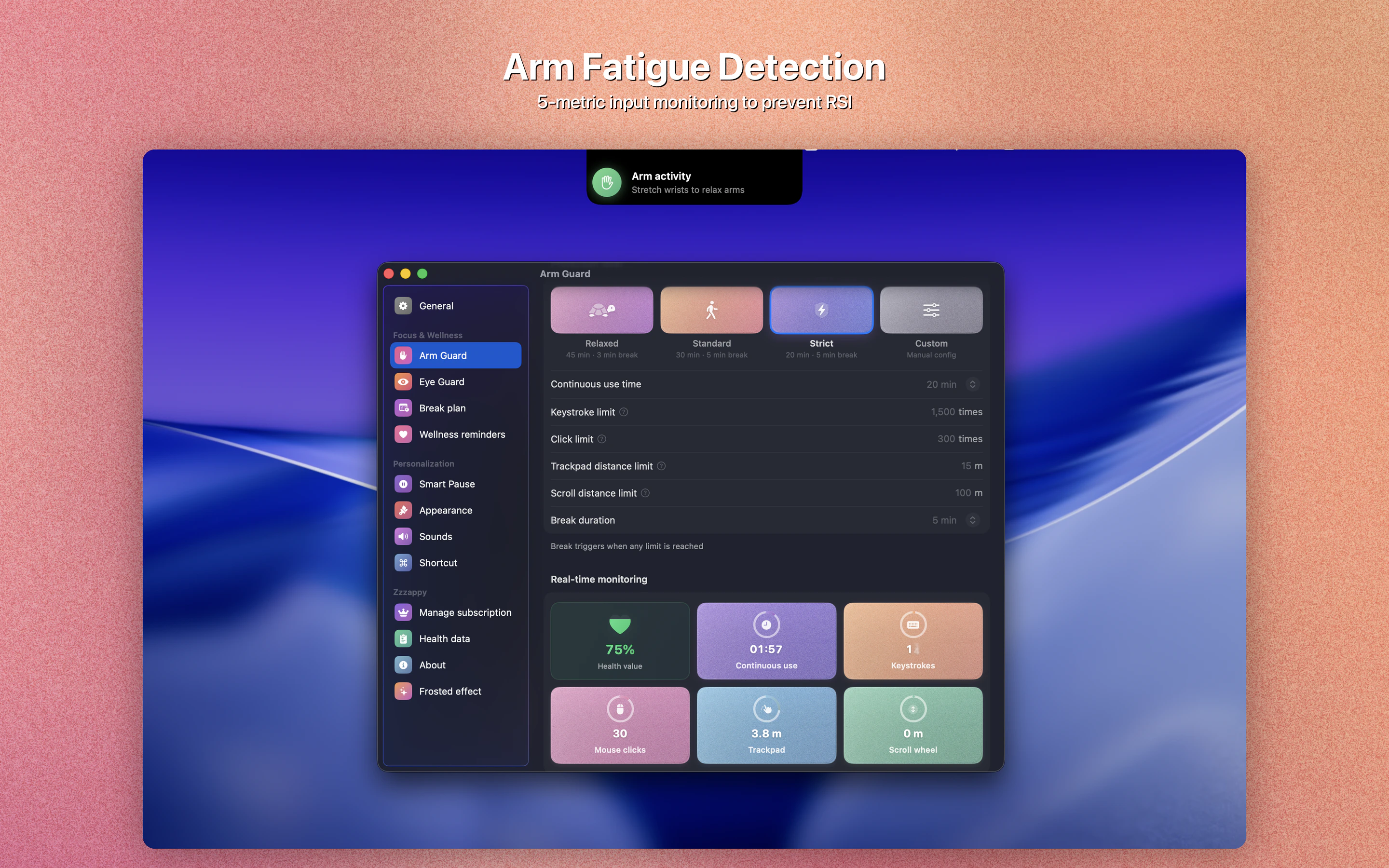
It tracks five input dimensions in real time: keystrokes, mouse clicks, trackpad travel distance, scroll distance, and continuous use duration. That’s not just “are you typing” but a composite picture of how hard your hands are actually working. A session heavy on trackpad scrolling looks different from one heavy on typing, and Zzzappy is trying to treat them differently.
Smart Pause detects when you’ve naturally stepped away and doesn’t punish you with a break timer when you come back. Immersive Breaks are guided rest activities during the break window rather than just a black screen. There’s a Health Dashboard that gives you a view of your input load over time.
The whole thing runs 100 percent offline. No data leaving your machine, no account required. For a tool monitoring your keystrokes and mouse behavior, that’s not a minor detail. That’s the product.
It got solid traction on launch day, landing in the top products of the day, which makes sense. This category has a built-in audience of people who’ve already googled “wrist pain from typing” at least once.
I keep thinking about the five-input composite as the genuinely novel piece here. If you’ve used NotchPad or any of the clever utility apps that sneak real functionality into the edges of macOS, you know that native apps doing specific things quietly tend to stick around. Zzzappy has that same quality.
The question is whether the five-signal model is actually calibrated to mean something, or whether it’s a number that sounds precise without being actionable.
The Verdict
I think this is a product with a real insight at its core and an execution that needs to prove itself over time.
The insight: time-based break reminders are too blunt. Load-based monitoring is the right framing. Zzzappy is one of the few apps I’ve seen that actually builds around that distinction instead of just mentioning it in the marketing copy.
The risk: precision theater. Five input dimensions sounds rigorous, but if the thresholds aren’t calibrated to real ergonomic research, it’s just a more complicated way to show you a number. I’d want to know what the science behind the Arm Guard thresholds actually is. The tagline says “science-backed” and I believe it in the eye care section where the 20-20-20 rule has clear optometric support. The RSI side needs the same receipts made visible to users.
At 30 days, the question is whether people keep it running or quit it after the second intrusive break. At 90 days, it’s whether the Health Dashboard actually changes behavior or just becomes a guilt graph nobody looks at.
For anyone who’s already thought seriously about ergonomics, and I’d include myself in that group after a particularly brutal Q4, this is worth installing. The offline-only stance alone clears a bar that most of its competitors don’t even try to meet.
Just show me the citations, Zzzappy.